1. Export a Final Cut 7 XML marker file from Adobe Premiere Pro
Open the sequence in Premiere Pro and go to File > Export > "Final Cut Pro XML".
2. Use the "Convertidor de marcadores" to convert the Final Cut 7 XML marker file into a CSV file
Open the free Convertidor de marcadores, select "Adobe Premiere Pro > Sequence (.xml)" and set "convert" to "CSV for Google Sheets". Generate and download the file. Si tienes problemas para convertir el archivo, puedes ponerte en contacto con el soporte gratuito.
3. Import the CSV file into Google Sheets
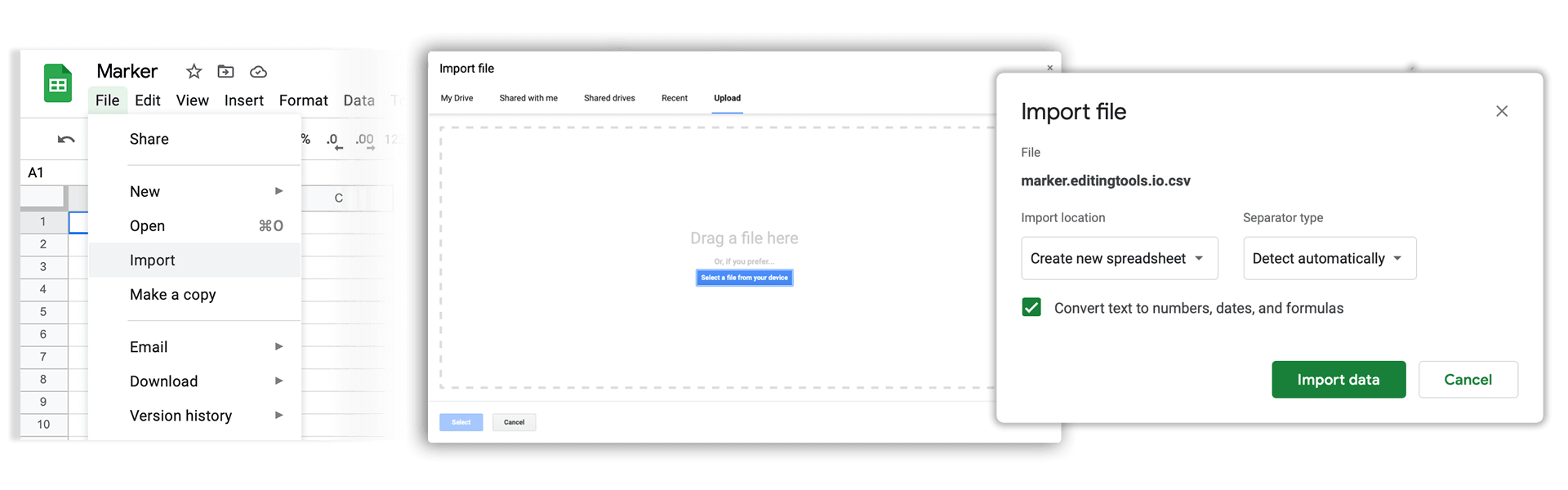
Open Google Sheets and go to "File -> Import". Upload the generated CSV file and press "Import Data" to generate the Sheet with all markers.
🚀 Listo
¡Eso es todo por ahora! Si este tutorial te ha resultado útil, compártelo para apoyarnos. Si tienes alguna sugerencia para mejorar el flujo de trabajo, ¡cuéntanoslo!