1. Use the "Herramienta y convertidor de subtítulos" to convert an Avid DS (Subcap) subtitle file into a Final Cut 7 XML marker file
Open the free Herramienta y convertidor de subtítulos, select "Avid DS (Subcap)" and set "convert" to "Adobe Premiere Pro > Sequence (.xml)". Generate and download the file. Si tienes problemas para convertir el archivo, puedes ponerte en contacto con el soporte gratuito.
2. Import the Final Cut 7 XML marker file into Adobe Premiere Pro
To import timeline markers, go to "File -> Import" and select the XML file.
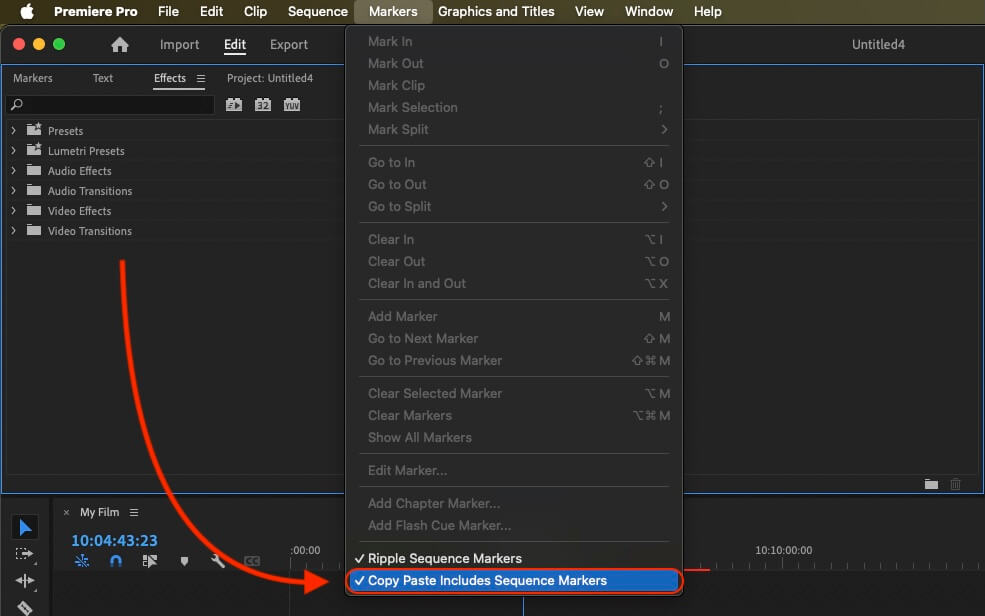
If you want to copy these markers into the existing sequence, use the adjustment layer or any other video as placeholder. Then copy the clip and switch to your existing sequence. Move the cursor to the location, where the adjusmtent layer or first marker appeared in the other sequence. Then past it. It will only copy the timeline markers if under setting (in the Markers menu) the option "Copy Paste Includes Sequence Markers" is active.
🚀 Listo
¡Eso es todo por ahora! Si este tutorial te ha resultado útil, compártelo para apoyarnos. Si tienes alguna sugerencia para mejorar el flujo de trabajo, ¡cuéntanoslo!